Showing posts with label uverse remote control. Show all posts

Monday, March 19, 2012

How To Program Uverse Silver Remote Control


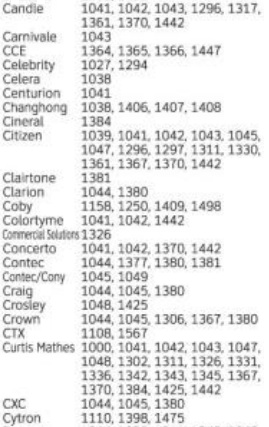
I am not sure if there are still Uverse customers who are using the standard silver remote control. But just in case though, I have here the list of the manufacture codes.

To program the silver remote control, we follow the same steps:
1. Hold both the mode key (tv, dvd, aux) and the ok button at the same time.
2. Let go and enter the code found below.
3. Try powering on and off the device. If the code you have tried doesn't work, try another code. Once the remote works, the same rule press the AT&T button to prevent any inconvenience.


 For standard TV

a-r
r-z
For HDTV

For TV-DVD Combo

For TV DVD TUBER COMBO; TV VCR COMBO; TV DVD VCR COMBO; TV VCR TUNER COMBO; TV VCR DVD TUNER COMBO; TV RECEIVER


For DVD


For DVD COMBO
For VCR


For HTIB


For RECEIVER TUNER


For AMPLIFIER


Thursday, February 9, 2012

How To Program Uverse Black Remote Control Part 4 (for other devices): S10-S3, S10-S2, S10-S1

To program s10-s3 with home theater in box (HTIB); receiver or tuner; amplifier; and dvd-vcr combo:
1. Press and hold both the AUX and the ENTER/OK buttons at the same time.
2. After a second or two, release both keys and enter the code for your htib. To test try powering on and off your device. If the code you have tried doesn't work, try another code and follow the same steps.
3. Once you have the remote control programmed, as a constant reminder, press the AT&T button to prevent any inconvenience.

I have arranged the codes alphabetically. Check the label and click the picture for you to get the codes.

figure 1. codes for HTIB
FOR RECEIVER OR TUNER:

figure 2.codes for tuner/receiver

FOR AMPLIFIER: 
figure 3. codes for amplifier

FOR TV-DVD COMBO:
figure 4. codes for tv-dvd combo
FOR TV-VCR COMBO:
figure 5. codes for tv-vcr combo
FOR TV-VCR-DVD COMBO:
figure 6. tv-vcr-dvd combo

FOR TV-DVD-TUNER COMBO:
figure 7. tv-dvd-tuner combo

FOR DVD-VCR COMBO:
figure 8. dvd-vcr combo


Please note that for the TV combo you need to follow the steps on programming the remote control with TV.


Wednesday, February 8, 2012

How To Program Uverse Black Remote Control Part 3 (For VCR and DVR): S10-S3, S10-S2, S10-S1

This is a continuation of programming a Uverse remote control s10-s3. You can always check the other blogs that I have which have the manufacture codes for TV and DVD.

I have arranged the codes alphabetically. Check the label and click the picture for you to get the codes.

To program your Uverse remote control to work with your VCR or DVR, you need to: 
1. Hold down BOTH the AUX and OK/ENTER simultaneously. 
2. After a second or two, release and enter the code manually. Check the pictures below for the code that corresponds to your device.

figure 1. A-S

figure 2. S-Z
3. To test if the code that you tried works, press power. If it powers off then try to power on again. You can try all the codes listed for your device if one code doesn't work and repeat the steps.
4. Once you have the remote control programmed, as a constant reminder, press again the AT&T button to prevent any inconvenience. 


Tuesday, February 7, 2012

How To Program Uverse Black Remote Control Part 2 (For DVD's): S10-S3, S10-S2, S10-S1

This is a continuation of my blog regarding programming s10-s3. I have already given the manufacture codes for TV's. This time you will be seeing the codes for DVD's or Blu Ray DVD's. You can check the first part of this blog if you need help with programming your remote control to work with your tv by checking my archive, searching on this blog, or checking tag s10-s3.


I have arranged the codes alphabetically. Check the label and click the picture for you to get the codes.

FOR DVD's:
1. Press and hold both the DVD and the ENTER/OK buttons simultaneously.
2. Let go of the buttons and enter the code for the brand of your DVD.
3. To check if the code you have tried works or not, try powering on and off. If it doesn't work, try another code and follow the same steps.
4. Once you have the remote working, as a constant reminder, press the AT&T button to avoid any inconvenience.

FOR DVD'S/ Blu Ray DVD's:

figure 1. A-L

figure 2. L-S

figure 3. S-Z
Check Part 3. For other devices.

Monday, February 6, 2012

How To Program Uverse Black Standard Remote Control: s10-1, s10-s2, s3

AT&T has three (3) standard black remote control. For you to check if you have it, just look at the back of it and it will show you the model of your remote control. See figure 1.


figure 1. back of standard black remote control

I just discovered that for the black remote controls, they all have the same manufacture codes. With my experience, manual codes work 99% of the time.

figure 2. s10-s3
GENERAL STEPS:

For you to program the remote control, you need to hold the mode key (tv, dvd, aux) and the enter button. (You can also hold both the mode and ok buttons example tv+ok.) After a second or two, enter the code for your device. To check if it is working, press power to power off your device. Then try to power the device on again and NEVER forget to press the AT&T button to avoid changing inputs, modes or any inconvenience. If you still ask why, if you DON'T press the AT&T button, you will notice that your Uverse stb/receiver won't turn on and off or you will not be able to control you receiver, pull up guide and change channels.

I have the remote control codes arranged alphabetically. So you just have to check the label and click the pictures for you to get the codes.

REMOTE CONTROL CODES: 

FOR TELEVISIONS:
To program your remote control with your tv:
1. Hold both the TV and the ENTER/OK buttons at the same time.
2. After a second or two, release and enter the code corresponding to the brand of your TV.
3. To check if it is working, try powering the tv set off and on. If the code that you tried didn't work, try another code and follow the same steps.
4. Once you get it working, as a constant reminder press the AT&T button to prevent any inconvenience. I have the codes alphabetically arranged. Just click the picture that corresponds to the brand of your tv.
By the way, for the TV combos remote control codes, please refer to part 4 of programming the remote control.

figure 3. A

figure 4. B


figure 5. C
figure 6. D-E


figure 7. F-G
figure 8. H-I
figure 9. J-L
figure 10. M
figure 11. N-O
figure 12. P
figure 13. Q
figure 14. S

figure 15. T

figure 16. U-Z

For DVD's and other devices check part 2 of this blog.